

You are now in the “Coach Selection'' phase, where your only task is selecting a coach that will support your leadership growth. You’ll notice that at this stage you will not be able to navigate all the functionalities yet. Follow the steps hereunder in order to access the coaches’ profiles.
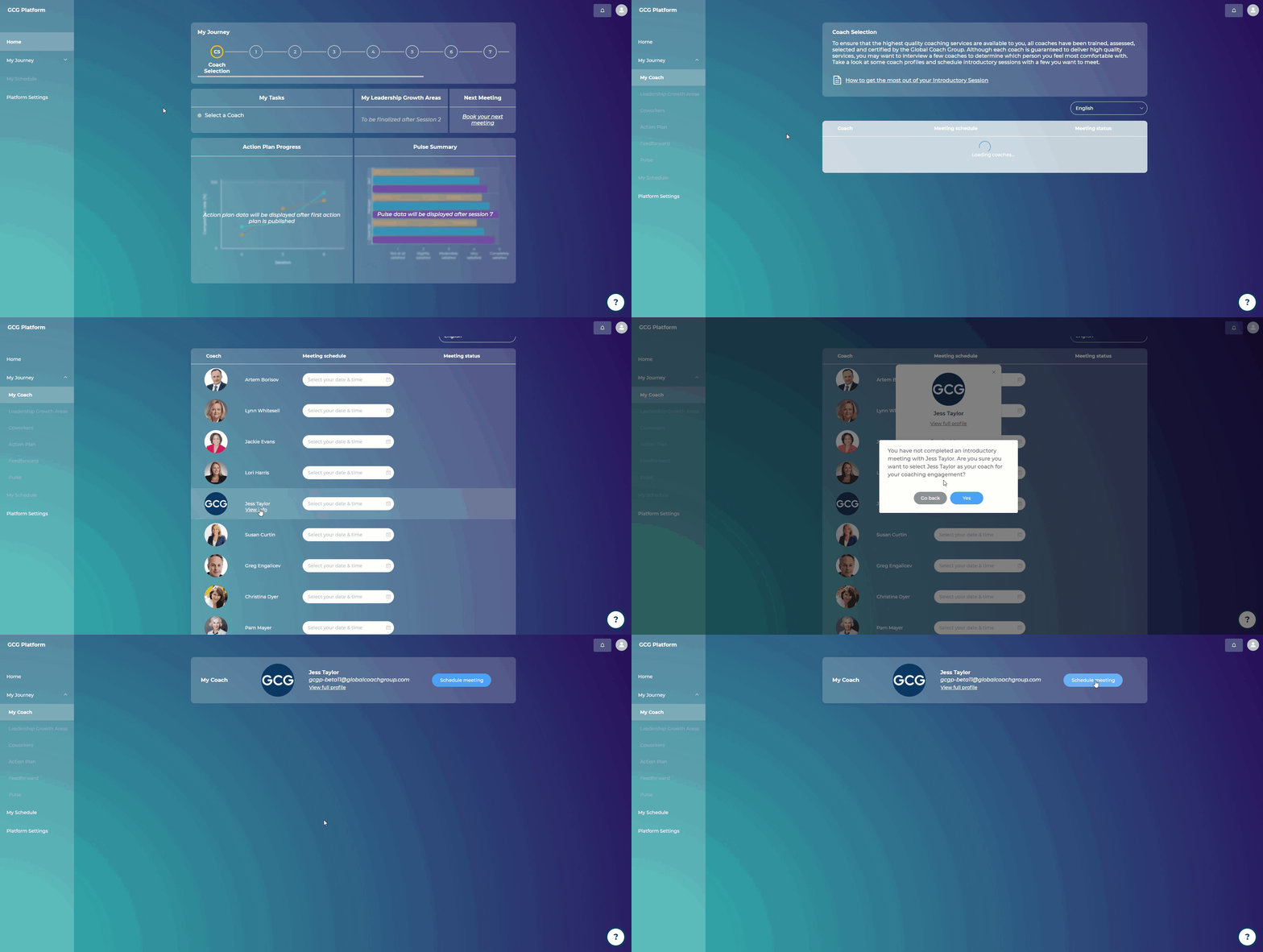
Steps:
In your home screen, click on "Select a Coach" under "My Tasks" (Alternatively, you can click on "My Journey" and select "My Coach")
You will see a list of coaches that are within +/- 4 hours difference from your time zone
You can filter by language and the system will display only the coaches that can provide coaching in your preferred language
Hover over the coach’s name and click “View info”
Click on “View full profile” to see the full profile of the coach
You can book an introductory 15-minute call with a coach, before you decide to select them as your coach: Click "Select your date & time" to pick a time for the introductory meeting - you will see only the coach's available hours.
Once you have booked a session, you will receive an email confirmation that contains the coach's video conferencing link
Once you are ready to select your coach, you can return to this page, click "View info," and click "Select as my coach"